
So what can we do about that?
This article covers ways that you can use client-side reporting, starting from CSP’s report-uri directive, and going into the W3C’s Reporting API. We’ll look at the standard reporting formats, configuring browser headers, how to handle them on the server side, using third-party tools to aggregate and analyse them, and a look at some of the diverse and ever-expanding array of things that can send you reports.
CSP takes the initiative
JOIN OUR NEWSLETTER
Stay updated on the IT Security Summit and industry trends.
W3C’s Content-Security-Policy (CSP) Level 2, finalised in 2016, was principally aimed at reducing the ability of attackers to inject malicious scripts into your pages (known as cross-site scripting, or XSS). But it also introduced a new capability: the browser can report violations of your policy back to a server you control. One good reason for doing this was that a good CSP header can be tricky to write; it was all too easy to break your own site, preventing the loading of images, scripts, fonts, and styles, breaking client-side functionality, and so on. So the idea was that you could define a policy, and then have the browser report back to you when it was violated, so you could fix it.
CSP has an alternative mode where instead of enforcing violations, it only reports them by simply naming the CSP header Content-Security-Policy-Report-Only instead of Content-Security-Policy. One neat trick is that you can actually set both of these at once, so you can enforce known-good policies while you experiment with others. This is a great way to test a new policy without breaking your site.
Whichever mode you choose, CSP level 2 provides a directive called report-uri which accepts a full URL of an endpoint where it will send violation reports. Here’s an example of a CSP header that enforces a policy and reports violations to a server:
Listing 1
Content-Security-Policy: default-src 'none'; img-src 'self'; script-src 'self'; report-uri https://example.com/csp
This policy says that by default the browser is not allowed to load anything from anywhere (a fail-safe approach; using ‘self’ as the default would mean that new CSP features are automatically enabled, which is less safe), but then adds exceptions allowing images and scripts to be loaded from its own domain. This is followed by a report-uri directive telling the browser to send violation reports to https://example.com/csp. If a user visits a page with this policy, and the page tries to load an image from another domain or run an inline script, the browser will block it and send a report to the specified endpoint telling you that it happened.
The Reporting API arrives
In the years after CSP level 2 was defined, browsers implemented this spec, and it turned out that this ability to report client-side problems is very useful. But it was limited to CSP; we don’t really want to define a whole new reporting mechanism for every kind of thing we might want to receive reports about. So the W3C created the Reporting API (RAPI), which provides a standard, generalised way of specifying reporting endpoints, an accompanying browser API, and a consistent reporting format that can be re-used by things other than CSP. The first working draft of the Reporting API was finalised in 2018, and is known as “v0”. A major revision to the standard happened in 2022, and is known as “v1”; while it continues to evolve (it is still considered a “working draft”), that version is broadly what is implemented today.
A key difference between the two is in the definitions of the HTTP headers that define reporting endpoints. In RAPI v0, the header is called Report-To, and it looks like this:
Listing 2
Report-To: { "group": "csp-reports", "max_age": 10800, "endpoints": [ { "url": "https://example.com/csp" } ] }
This is a JSON snippet that provides a reporting group name (here “csp-reports”), a maximum age for the endpoint telling browsers how long to remember this for, and an array of endpoints. Note that a single endpoint is defined here, but the spec allows for multiple entries in the endpoints array (hence the use of “group” rather than “name”). While this is workable, JSON isn’t an efficient way to express this information (all those extra brackets and quotes), and it turns out that multiple endpoints were not actually very useful. So in RAPI v1, the header was changed to Reporting-Endpoints, using a far simpler approach that looks like this:
Listing 3
Reporting-Endpoints: csp-reports="https://example.com/csp"
This header has no parameters other than the endpoint name and URL; you can add more endpoints in the same format, separated with commas. The names I’ve chosen here are completely arbitrary — it’s up to you to choose names that make sense for your application, and you don’t have to define separate endpoints for every kind of report because you can tell them apart at the receiving end, as we will see. The lack of a max-age directive is dealt with by simply including this header in every response that you want reports for. If you’re using HTTP/2 or 3 (you can read my book about that!), this header will be compressed to almost nothing, minimising overhead.
Version confusion
There is a mix of terminology that can get quite tricky, so to be clear, there are four things with similar names you need to be clear on:
- Report-To: an obsolete RAPI v0 HTTP header defining named reporting endpoints.
- Reporting-Endpoints: a current (though technically still a draft) RAPI v1 HTTP header defining named reporting endpoints.
- report-uri: a deprecated CSP level 2 directive that specifies a URL to report violations to.
- report-to: a current (though technically still a draft) CSP level 3 directive that specifies a named endpoint to report violations to.
RAPI is widely supported
RAPI is widely supported across all major browsers, according to caniuse.com. Most browsers have had support for RAPI v1 for several years, but Firefox only added support in March 2026 (Fig. 1).
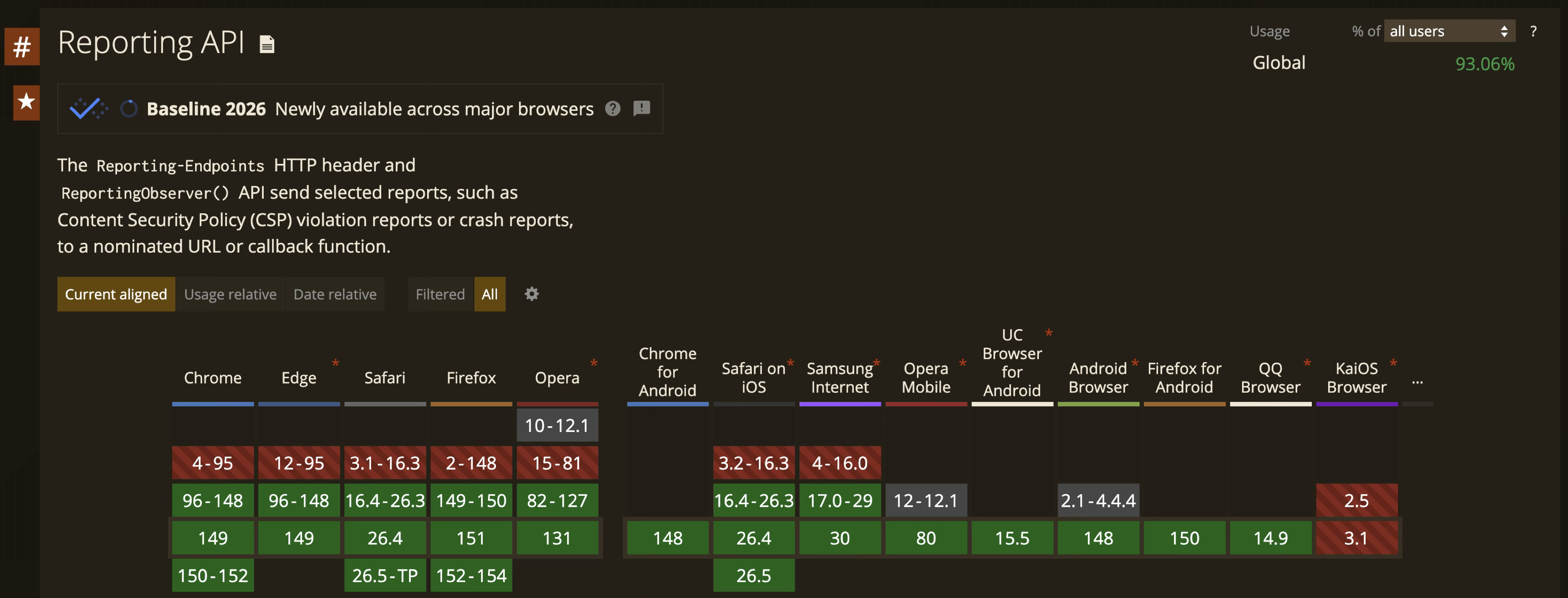 Fig. 1: RAPI browser support matrix.
CSP joins RAPI club
CSP level 3, which remains a working draft, defines a new directive called report-to, and instead of taking a full URL of a reporting endpoint, takes the name of one defined in a RAPI header. For backward compatibility, both directives can be defined at once, and a browser that knows about CSP 3 will favour the report-to directive over the report-uri directive. So we can extend our original CSP header to support RAPI. Similarly, we can define our reporting endpoints so that we cover clients supporting both RAPI v0 and v1:
Listing 4
Content-Security-Policy: default-src 'none'; img-src 'self'; script-src 'self'; report-uri https://example.com/csp; report-to csp-reports
Reporting-Endpoints: csp-reports="https://example.com/csp"
Report-To: { "group": "csp-reports", "max_age": 10800, "endpoints": [ { "url": "https://example.com/csp" } ] }
What’s in a report?
When using CSP2, it was the CSP specification that determined the report format. Here’s an example:
Listing 5
{
  "csp-report": {
    "document-uri": "https://example.org/page.html",
    "referrer": "https://evil.example.com/haxor.html",
    "blocked-uri": "https://evil.example.com/image.png",
    "violated-directive": "default-src 'self'",
    "effective-directive": "img-src",
    "original-policy": "default-src 'self'; report-uri https://example.org/csp-report"
  }
}
This tells us that when loading https://example.org/page.html, which has the CSP default-src ‘self’; report-uri https://example.org/csp-report, the page tried to load an image from https://evil.example.com/image.png. The CSP doesn’t define an img-src directive (which is the applicable (effective) directive because this issue was related to image loading), so it fell back to default-src, which doesn’t allow loading from https://evil.example.com/, so the image request was blocked, and the browser sent a report to https://example.org/csp-report telling us it happened. A minor annoyance is that the field names use “kebab-case”, which is not typically a format that is allowed for variables or property names in many programming languages, so you’ll need to remap the names before using them in your code.
When using CSP3, the report format is defined by the Reporting API specification. With RAPI, the same issue would be reported like this:
Listing 6
{
  "age": 0,
  "type": "csp-violation",
  "url": "https://example.org/page.html",
  "user_agent": "Mozilla/5.0",
  "body": {
    "documentURL": "https://example.org/page.html",
    "referrer": "https://evil.example.com/haxor.html",
    "blockedURL": "https://evil.example.com/image.png",
    "violatedDirective": "default-src 'self'",
    "effectiveDirective": "img-src",
    "originalPolicy": "default-src 'self'; report-to csp",
    "disposition": "enforce",
    "statusCode": 200
  }
}
The 5 top-level fields: age, type, url, user_agent and body are part of the RAPI specification. The age field is the time in seconds since the report was generated (as you’ll see, reports are not sent immediately). The type field tells us what kind of report this is; in this case it’s a CSP violation, but other types are possible. The url field is the URL of the page that generated the report, and the user_agent field is the user agent string of the browser that generated it. Finally, the body field contains the same information as before, but with slightly different names for some of the fields. The format and naming of the fields within the body section is defined in CSP3, but the top-level is RAPI. This consistent pattern means that a single endpoint can handle multiple report formats; it just needs to look at the type field to determine how to process the report.
What else can we do?
JOIN OUR NEWSLETTER
Stay updated on the IT Security Summit and industry trends.
So now we have a reporting format, and somewhere to send reports to, what else can use this mechanism? The list of possibilities is already quite long, and getting longer!
CSP hash reports
CSP has a feature called Subresource Integrity, or SRI, in which a precalculated hash of a resource is inserted in the CSP alongside its origin. When a browser fetches it, it will check the hash matches what was expected. This prevents your site from loading unexpected upstream changes from third-parties that are outside your control (a.k.a. supply-chain attacks). CSP hash reporting is not that feature!
CSP hash reports are very useful for keeping track of your Software Bill of Materials, or SBOM, which lists all the resources that your page uses. It’s easy enough to keep control of this manually if you have a simple site with a few scripts that you host yourself. If, however, you have an extremely dynamic site that loads scripts in varying ways from unknown origins, for example if you’ve been forced to add Google Tag Manager to your site (nobody sane would use it out of choice!), it’s a far more difficult proposition. All you need to do is to add the report-sha256 keyword to the script-src directive in your CSP header, and the browser will report every script that your site loads. You do need to ensure that external scripts are loaded with crossorigin=”anonymous”, or the hashes will be empty. Unlike SRI hashes, you don’t have to calculate hashes in advance, and they will always be the same for the same content, so if you are loading jQuery from one CDN and switch to another, its hash will remain the same. Conveniently, this means that your report analysis system can pre-calculate the hashes of known resources and identify scripts by their hash, making the assembly of dynamic SBOMs much easier.
Whereas CSP violations are only sent when a problem occurs, CSP hash reports are always sent, and they do not signify errors. Here’s an example of a CSP hash report:
Listing 7
{
  "type": "csp-hash",
  "age": 12,
  "url": "https://example.com/",
  "user_agent": "Mozilla/5.0",
  "body": {
    "document_url": "https://example.com/",
    "subresource_url": "https://example.com/main.js",
    "hash": "sha256-2bFFc6BUJ67aVaBG/pflFLuNP5C4bHtJjlUJzaQVZhs=",
    "type": "subresource",
    "destination": "script"
  }
}
We’ve got the standard RAPI report format, but this time with a csp-hash type. It tells us that the page at https://example.com/ loaded a script from https://example.com/main.js, and the (base64-encoded) SHA256 hash of that script is 2bFFc6BUJ67aVaBG/pflFLuNP5C4bHtJjlUJzaQVZhs=. The type field tells us that this is a subresource, and the destination field tells us that it is a script. Note that this report piggybacks on CSP’s report-to target, so their two report formats will share the endpoint. CSP also supports report-sha384 and report-sha512 keywords, calculated using the SHA2-384 and SHA2-512 algorithms respectively, though I think they add more length than value.
Network error logging
One big thing that can go wrong on the client side, without you being aware, is network errors. Say your page loads a script from a CDN – but it could be down, it could have a DNS problem (it’s always DNS), its certificate might have expired, yet you have no visibility of these problems because it’s happening only on the client side. Network Error Logging (NEL) provides a mechanism for reporting these too. Just like CSP, you can define a reporting endpoint for network errors using a report-to directive in your NEL header, and the browser will send reports when it encounters network errors while loading resources. NEL can report issues grouped into the phases: DNS, connection, and application. The DNS phase covers lookups returning nothing, and DNS servers not responding; connection phase covers TCP (e.g.server is down) and TLS issues (e.g. certificate has expired); finally, the application phase covers issues that occur after the connection is established, which can include things like redirect loops, user aborts, HTTP errors (even things like 404s), and browser crashes. An NEL header looks like this:
Listing 8
NEL: {"report_to": "nel", "max_age": 31536000, "failure_fraction": 1.0}
This will send reports to an endpoint named nel, and the browser will remember to do this for your domain for the next max-age seconds. Failure fraction determines the proportion of instances of an error that will be reported — 1.0 means all of them. You might want to turn this down if you have a very busy site — you don’t need millions of identical reports to trigger an identifiable anomaly, nor do you want your reporting system to be overwhelmed. A NEL report looks like this:
Listing 9
{
  "age": 147,
  "type": "network-error",
  "url": "https://example.com/page.html",
  "user_agent": "Mozilla/5.0",
  "body": {
    "sampling_fraction": 1.0,
    "server_ip": "192.168.0.123",
    "protocol": "http/1.1",
    "method": "GET",
    "request_headers": {},
    "response_headers": {},
    "status_code": 0,
    "elapsed_time": 5000,
    "phase": "dns",
    "type": "dns.name_not_resolved",
    "url": "https://cdn.example.net/image.png"
  }
}
This shows that when your site requested an image from https://cdn.example.net/, the browser’s lookup for the domain failed, triggering the report. Note the elapsed_time field, which tells you how long the browser waited before giving up, suggesting this is likely a local configuration issue with the user’s DNS server. While you can’t do anything about that, it’s still interesting data that you would not otherwise have seen.
NEL isn’t very useful
Unfortunately NEL is much less useful than it sounds. NEL has not yet been updated to use RAPI v1, so you must provide a Report-To heder to define where you want its reports to go; it won’t work with Reporting-Endpoints. We can live with that, but a more serious caveat is how it sends reports. Say your page at https://example.com/ loads a script from https://cdn.example.net/, but the server is down. The browser will use the NEL from cdn.example.net, not your own example.com domain. However, that means that the browser must have encountered an NEL header belonging to cdn.example.net before it loaded your page that triggered the error. In practice, this is fairly unlikely to have happened, so it won’t send a report. If it has seen the NEL from that domain, and the max-age has not expired (so for your own, you want to set this value really high), it will send a report, but it will send it to whatever endpoint cdn.example.net is configured to use, which is not under your control and thus tells you nothing. NEL also has the ability to report TLS failures — but if a site has an expired certificate, the browser will not get as far as seeing its NEL header, and thus will not even know it should send a report.
Sadly, all this conspires to make NEL mostly useless. It might be useful if you are running a CDN, where others are frequently requesting your resources from other sites, but it’s not much use for your own site.
Permissions policy violations
The Permissions-Policy (PP) header allows you to enable, and more importantly disable, browser features. If your site has no use for audio input or geolocation services, you can disable these features entirely. If an attacker manages to inject a script that tries to eavesdrop on your visitors, or find out where they are, the browser will not permit them to do so. This header used to be called Feature-Policy, but it was renamed to Permissions-Policy in 2021. The PP header also supports RAPI, and a PP header using a reporting endpoint called “pp” looks like this:
Listing 10
Permissions-Policy: fullscreen=(self);report-to=pp, microphone=();report-to=pp, geolocation=();report-to=pp
This says that your own site can request fullscreen mode, microphone input and geolocation are disabled, and that any violations should be reported to the “pp” endpoint. Annoyingly, there is no default reporting endpoint, so you have to specify one for every feature. A permissions-policy-violation report type looks like this:
Listing 11
{
    "type": "permissions-policy-violation",
    "url": "https://example.com/",
    "user_agent": "Mozilla/5.0",
    "age": 120,
    "body": {
        "sourceFile": "https://example.com/permissions.js",
        "columnNumber": 23,
        "disposition": "enforce",
        "lineNumber": 1,
        "message": "Permissions policy violation: Geolocation access has been blocked because of a permissions policy applied to the current document. See https://crbug.com/414348233 for more details.",
        "policyId": "geolocation"
    }
}
Here you can see that a script called permissions.js attempted to call the browser’s geolocation API, which was blocked by the permissions policy, triggering this report.
Document policy
The Document-Policy header is a WCAG draft (and is not widely supported yet) that is quite similar to the Permissions-Policy header, but is used to control site content rather than browser features. For example, you might use it to limit image sizes. In August 2026, Microsoft released a proprietary extension to the Document-Policy header called network-efficiency-guardrails that allows you to set some useful policies through a single keyword. network-efficiency-guardrails bundles several useful policies that can trigger reports:
- text content served without compression (e.g. HTML, CSS, JSON, JavaScript)
- use of uncompressed formats when compressed formats exist (e.g. .ttf vs .woff2)
- images larger than 200kB
- data: URLs bigger than 100kB
- fonts larger than 96kB
- An example of a Document-Policy header is:
Listing 12
Document-Policy: network-efficiency-guardrails;report-to=doc-neg, something=1.0;report-to=none, *;report-to=doc
In this example, these policies will send to an endpoint called doc-neg. We have also set a property called something to 1.0 (in reality this might be a specific control, like maximum image width), and set its report-to directive to none, so it will not report violations (this is a special value; it won’t send reports to an endpoint called none!). Unlike Permissions-Policy, it supports a default reporting endpoint that we can attach to the special * wildcard policy.
By this point you should guess that there is an accompanying report format, but I’ll omit it here for space reasons.
Connection allowlist
Connection-Allowlist is a header added to Chrome by Google in August 2026, and is currently behind a feature flag so you need to explicitly enable it. It was introduced to allow sites to specify the connections a browser is allowed to make by any means. While there is some overlap with CSP, especially its connect-src directive, it is a simpler, lower-level, more focused header that is designed specifically to help sandbox AI agents and canvases, preventing them from making arbitrary connections. It looks like this:
Listing 13
Connection-Allowlist: (response-origin "https://trusted.com/*"); report-to=ca
This says that the browser is allowed to make connections to its own origin domain (response-origin, much like ‘self’ in CSP) and https://trusted.com/, and report any unauthorised connections to the ca endpoint. The key concept here is that “by any means” qualifier; these restrictions are applied at the browser’s lowest networking level, blocking connections that do not meet the allowlist criteria for any reason, whether by loading script tags, images, CSP rules, JavaScript Fetch requests, CSS references, Websockets and WebTransport, or any other means. This is really aimed at AI tools that are increasingly prone to escaping their confines!
Of course there is a report format for this header too.
…and there’s more
We don’t have space to get exhaustive here, but you’ll gather that RAPI is something of a success. Here are a few other services that can use it:
- Deprecations — send reports when your browser does something that’s been deprecated, like using synchronous XHR.
- Interventions — send reports when a browser does something for the user that’s not necessarily deprecated, but just bad UX, for example, blocking an intrusive ad, or refusing to play audio without asking first; likely to be removed from browsers in the future.
- Cross-Origin-Opener-Policy — send reports when a browser does something that violates the COOP policy, for example, opening a new window without setting opener.
- Browser crashes — send reports when the browser crashes unexpectedly (obviously won’t be sent until the browser is relaunched!).
Some of these reporting mechanisms have nowhere to define a reporting endpoint — for example there is no header to control where browser crashes are sent. To resolve that, such reports will target an endpoint called default, so if you want to receive such reports, you need to include an endpoint with that name in your Reporting-Endpoints header.
And there are new ways to use RAPI appearing regularly.
Sending reports
We’ve seen lots of ways to generate these reports, but how does the browser actually send them? Some of these reports might get quite chunky, and we would prefer it if they didn’t interfere with the loading of our site. Reports will typically be generated immediately when your page is loaded (some might occur later, when the user interacts with the page), but so that they don’t interfere with the loading of our site, they are delayed (in Chrome by about 30 seconds), sent asynchronously, and reports of the same type can be batched together to reduce request count. Chrome developer tools has a nice panel that shows all the reports that have been generated and sent. You’ll find it under Application -> Reporting API:
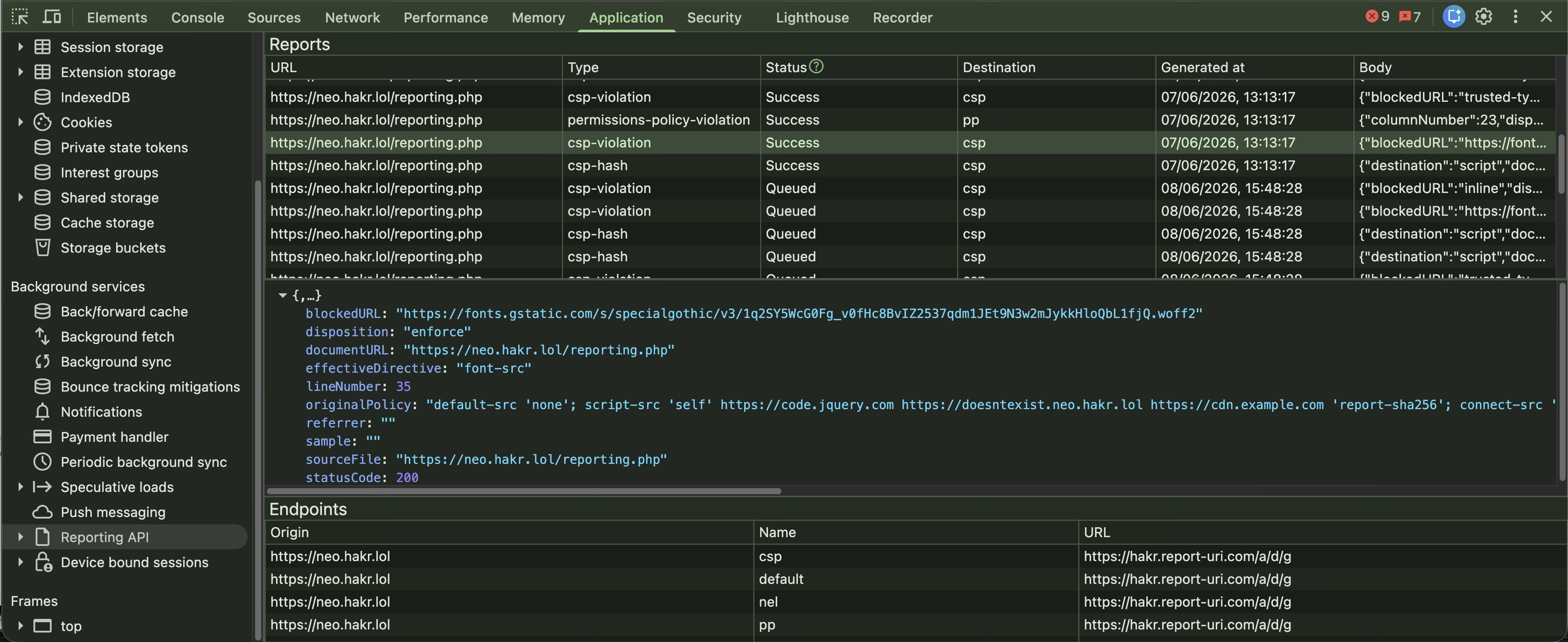 Fig. 2: Reporting API panel in Chrome developer tools.
In this panel, we can see the list of named reporting endpoints at the bottom (they all share the same URL in this example), a list of reports at the top, and a preview of the contents of a single report in the middle. The report list shows the source URL, the type of report, its sending status, when it was generated, and a preview of the report body (note not the whole report). The send status shows Success and Queued status values; some reports have already been sent, and others are waiting to be sent, staying “out-of-band” for normal site activity, and allowing some time to accumulate other reports to batch along with the existing ones. Batches are limited to a single report type, so while you might get multiple CSP reports bundled into one batch, you won’t get a mixture of CSP and PP reports in the same batch.
Receiving reports
To receive reports, you need to have a server that can handle incoming HTTP requests. Fortunately, this probably describes the very system that you’re generating reports from, and you can extend it quite easily to accept these report requests. I’m not about to tell you how to set up these routes and handlers in your own application, but that’s exactly what you need to do if you’re going to take on this responsibility.
If the reporting endpoint is not the same as your own domain (for example if you’re using a third-party reporting service), the browser will first send a CORS preflight OPTIONS request to check whether the server is willing to accept the report:
Listing 14
OPTIONS /csp-report-endpoint HTTP/1.1
Host: reporting.example.net
Origin: https://example.org/
Access-Control-Request-Method: POST
Access-Control-Request-Headers: content-type
and the server will respond in the affirmative if it’s allowed to accept the report:
Listing 15
HTTP/1.1 200 OK
Access-Control-Allow-Origin: https://example.org/
Access-Control-Allow-Methods: POST
Access-Control-Allow-Headers: content-type
Access-Control-Max-Age: 86400
After that, the browser will send the actual report to the server using the RAPI application/reports+json content type:
Listing 16
POST /csp-report-endpoint HTTP/1.1
Host: example.com
Origin: https://example.org
Content-Type: application/reports+json
Content-Length: 489

{
  "age": 0,
  "type": "csp-violation",
  "url": "https://example.org/page.html",
  "user_agent": "Mozilla/5.0",
  "body": {
    "documentURL": "https://example.org/page.html",
    ...
After this, the endpoint will receive the report and can process it as needed. It’s up to you to parse, store, process, monitor, aggregate, and understand what these reports mean. That’s a fairly big task in its own right, so you might want to hand off responsibility to a third-party service to do that for you.
If you’re in the Laravel world, I’ll take this opportunity to promote my own package: synchro/laravel-violations provides routes, parsing, and proxying for several of the report types we’ve covered here, along with helpers for integration with spatie/laravel-csp for building CSPs.
Third-party report handlers
Unsurprisingly, there are quite a few third-party (3P) services that can help you receive, process, and analyse these reports. One example is report-uri.com; full disclosure: they have provided me with an account to help promote RAPI reporting, and I will be using their service in examples. Their service is very good, but there are others like sentry.io, centralcsp.com, and reporting-api.app.
This is Report-URI’s dashboard, showing an overview of all report types that it has received:
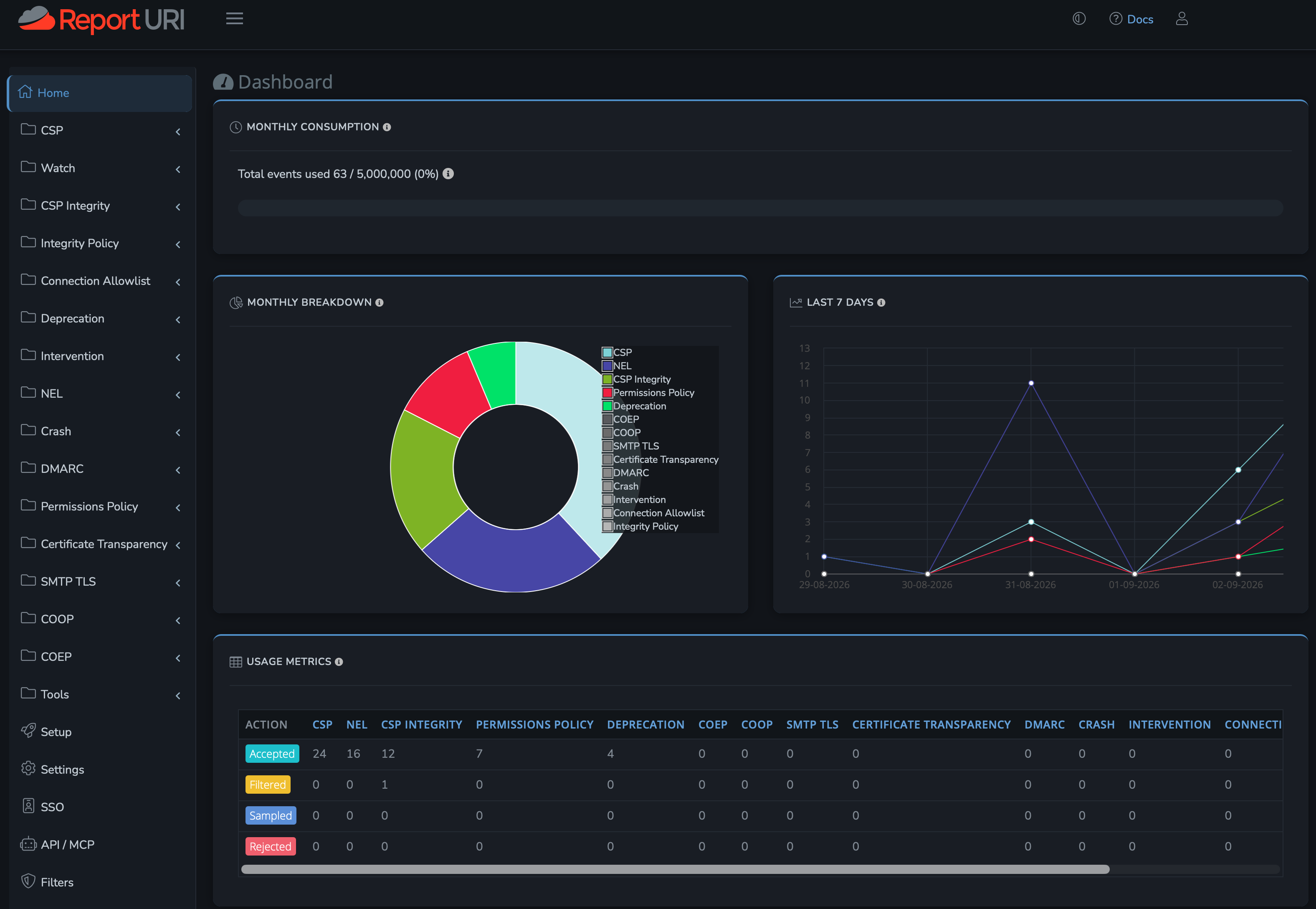 Fig. 3: Report-URI dashboard.
And here’s a CSP reports table:
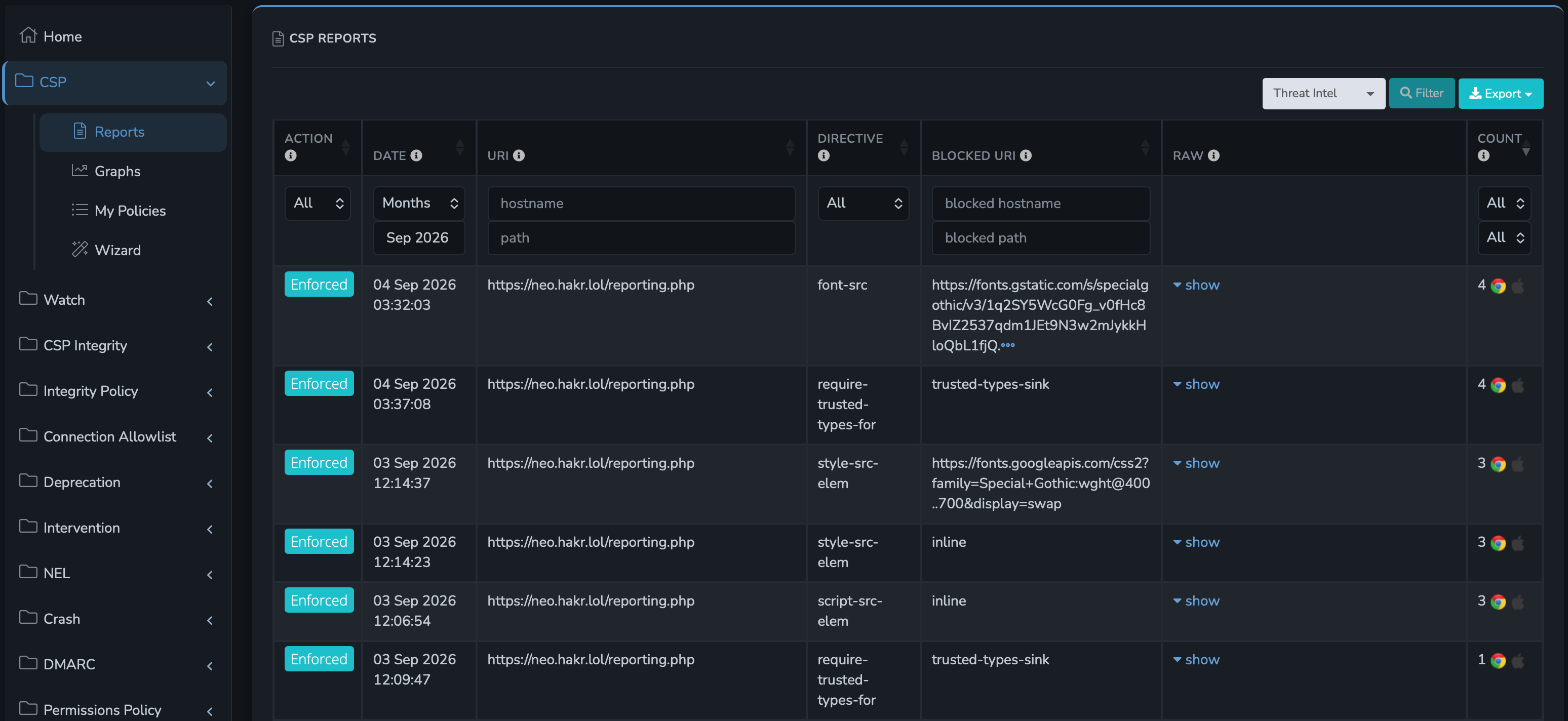 Fig. 4: CSP reports table.
There are many other such reports, and it provides the ability to filter, search, sort, and group them, helping you focus on the ones that are making the most noise! You can also set up notifications for anomalous behaviour, such as when you suddenly start receiving a flood of reports.
Privacy impact
One problem with using a 3P service is that it effectively leaks some information about your visitors. The 3P will receive requests directly from your visitors browsers, meaning that they get to see their IP, fingerprintable browser data, URLs they were looking at, time of day, aggregate traffic stats, and other information about browsing behaviour that you may not want them to see. GDPR specifically requires that you document (ahead of time!) the data that you expose to data processors such as this.
For that reason, something you might want to do instead is to proxy reporting requests through your own server, so that you receive the report from the client, but then forward it on from your server to the 3P. This will mean that all your reports will appear to originate from your sever, denying you the ability to trace back to the client’s IP or geoIP location, but it resolves the 3P exposure, and you can always keep IP references on your own server, where you can retain full control over it. This exposure was actually why I built my Laravel package, and it has built-in support for asynchronously forwarding reports to 3P services.
Calling the Reporting API from JavaScript
RAPI doesn’t only define the Reporting-Endpoints header and the report format, it also provides an in-browser JavaScript API that is widely supported. Here’s a simple example of intercepting a CSP report:
Listing 17
if (window.ReportingObserver) {
  const observer = new ReportingObserver((reports, observer) => {
    for (const report of reports) {
      if (report.type === "csp-violation") {
        console.log("CSP Violation:", report.body);
        // Do something else with the report
      }
    }
  }, { types: ["csp-violation"] });

  observer.observe();
}
Summary
- Define Report-To and Reporting-Endpoints headers in your application.
- Target them from report-to directives in the various headers that can use them, especially CSP.
- Handle reports in your application, or use a third-party service.
- Look longingly at NEL and think what might have been.
- Receive and aggregate reports, and use them to fix issues in your apps or deployment.
- Finally see (and fix) all the problems that only your clients were seeing!
References
- Reporting API: https://w3c.github.io/reporting
- CSP2: https://www.w3.org/TR/CSP2/
- CSP3: https://www.w3.org/TR/CSP3/
- NEL: https://www.w3.org/TR/network-error-logging/
- CSP hash reporting: https://centralcsp.com/docs/report-sha-keyword
- Permissions Policy: https://w3c.github.io/webappsec-permissions-policy/#reporting
- Document Policy: https://wicg.github.io/document-policy/
- Connection-Allowlist: https://wicg.github.io/connection-allowlists
- Deprecations: https://wicg.github.io/deprecation-reporting/
- Interventions: https://wicg.github.io/interventions/
- Crashes: https://wicg.github.io/crash-reporting/
- COOP: https://developer.mozilla.org/en-US/docs/Web/HTTP/Reference/Headers/Cross-Origin-Opener-Policy
- CSP evaluator: https://csp-evaluator.withgoogle.com
- My Laravel report handling package: https://github.com/synchro/laravel-violations
- Report-URI reporting service: https://report-uri.com/
Author
🔍 FAQ
1. What is the browser Reporting API?
The Reporting API is a browser mechanism for sending structured reports about client-side events to a reporting endpoint. It provides a standardized way for different browser features, such as Content Security Policy, to report problems and policy violations.
2. What can the Reporting API be used for?
It can be used to collect different types of browser-side reports, including CSP violations, CSP hash reports, Permissions Policy violations, deprecation and intervention reports, Cross-Origin-Opener-Policy issues, and some browser crashes.
3. What is the difference between Report-To and Reporting-Endpoints?
Report-To is the older Reporting API v0 header used to define named reporting endpoints. Reporting-Endpoints is the newer v1 header and uses a simpler syntax for defining those endpoints.
4. What is the difference between CSP report-uri and report-to?
report-uri is a CSP Level 2 directive that specifies the reporting URL directly. report-to is the newer CSP Level 3 approach and refers to a named endpoint defined through the Reporting API.
5. Can I test a Content Security Policy without blocking content?
Yes. Using the Content-Security-Policy-Report-Only header allows the browser to report violations without enforcing the policy. This makes it useful for testing a new CSP before deploying it in enforcement mode.
6. What kinds of client-side problems can browser reporting reveal?
Browser reporting can help expose issues that may not appear in server logs, such as blocked resources, CSP violations, browser policy violations, certain network failures, deprecated browser features, and other problems occurring directly in the user’s browser.
7. Does Network Error Logging work with the Reporting API?
Network Error Logging can generate reports about problems such as DNS, connection, TLS, and application-level failures. However, the article notes several limitations that can make NEL less useful in practice, particularly when errors occur on third-party domains.
8. How are browser reports sent?
Reports are typically generated when an event occurs, then sent asynchronously so they do not interfere with page loading. Browsers may delay and batch reports of the same type before sending them to the configured endpoint.
9. Can I use a third-party service to collect Reporting API reports?
Yes. Third-party reporting platforms can receive, aggregate, filter, and analyze browser reports. However, sending reports directly to a third party can expose information such as visitor IP addresses, browser data, URLs, and browsing behavior, so privacy and GDPR implications should be considered.
10. Can Reporting API reports be accessed with JavaScript?
Yes. The browser-side ReportingObserver API can be used to observe supported report types in JavaScript and process them directly in the application.
11. Why is browser-side reporting important for IT security?
Server-side monitoring does not always show what is happening inside a user’s browser. Browser-side reporting can provide additional visibility into security violations, blocked resources, policy problems, and other client-side events that would otherwise be difficult to detect.