Software containers have gone from being the preserve of cutting-edge organisation to being a standard way to deploy production software. According to the Linux Foundation Annual Cloud Native Survey, more than half (55 percent) of companies now use containers for their production. Yet while containers have become de rigeur for deployment from a technical perspective, 47 percent of those surveyed said cultural changes were now the biggest challenge that they faced.
A good example of this is security. Continuous Integration/Continuous Deployment (CI/CD) pipelines are now present in 91 percent of mature organisations, pointing to a ubiquitous approach to managing software, security around CI/CD is not as well developed. While pulling containers from a public registry might make the whole process easier and faster for developers, there are plenty of security problems that can enter the pipeline at that point too. Our Threat Research Unit analysed more than 34,000 container images for potential security issues, and there were some consistent risk indicators to be aware of.
What are the problems to look out for?
Public container registries host container images that any developer can use in their software. Examples include Docker Hub, Amazon Elastic Container Registry, Google Artifact Registry and Azure Container Registry, which can all host containers for pull requests. These registries can store, share, and distribute container images that bundle application code, runtime, libraries, and configuration into a single deployable unit.
While these registries are managed and maintained, there are issues that can affect security. Because they are convenient and supported by major vendors, developers can trust the container that they look for and bring it into an application without applying security checks. That convenience has quietly shifted trust decisions earlier in the development lifecycle, often without sufficient scrutiny of what is actually being deployed. Threat actors can use this distribution channel to hide harmful payloads inside seemingly legitimate images.
To combat this, there are some steps that you can take to prevent suspicious containers from entering your CI/CD pipeline in the first place, and some processes that can root out bad containers if they do get through.
To start with, you should include time to check potential malicious container images and potential threats in the first place. For example, look at the full repository name for images that you interact with. Attackers will often use names that closely resemble legitimate software or popular images in order to take advantage of spelling mistakes in a search. They can also deliberately choose completely non-pronounceable names made up of random-looking strings of characters to evade detection.
JOIN OUR NEWSLETTER
Stay updated on the IT Security Summit and industry trends.
Another warning sign for a potentially malicious container is a low pull count. Legitimate images typically accumulate thousands or millions of pulls over time, which is a sign of widespread adoption and community trust. A malicious image will typically have very low pull counts. If you are looking at something that should be widely used across the industry by thousands of organisations, a low count in the hundreds count will be a tell.
Alongside the name for a container image, you should also Inspect the image layers within any container you pull from a public repository. This can expose execution artifacts, such as embedded cryptomining binaries, obfuscated scripts, or tools for persistence and lateral movement.
What are the risks from malicious containers?
In our recent analysis of more than 2,500 confirmed malicious images hosted on Docker Hub, 70 percent were identified as containing cryptomining software, most commonly Monero. The remaining images included other malware such as remote access and backdoors, ransomware, keyloggers and proxy infrastructure.
Cryptomining is popular for attacks on container registries, as uploading an image is easy and it is not difficult to get workloads included into how developers work. The container itself can be built to include the software that developers are normally looking for, which then makes it hard to spot the malware until it has been triggered.
Malicious container images also normally contain all the elements that they need to work, rather than needing additional downloads or connection to a Command and Control server to implement more functionality. From a security perspective, individual containers can sneak through because tools focus more on hosts and workloads rather than the internal code.
How to prevent container registry attacks affecting your pipelines
To improve security around your containers, start with your own registry and the images that you rely on regularly. This will give you a starting point to know what “good” container security looks like, and you can assess any images against those that you use and rely on.
From this, you can then enforce security policy measures to prevent any build or deployment of images that contain vulnerabilities, malware or unauthorised software. For example, automate scans on your internal container registries to identify vulnerabilities, zero-day malware, and secrets in packages and applications before deployment and apply that same approach to images pulled from public container registries if you have to support them. Using automation, you can perform this assessment continuously against in-use and mission-critical images.
On the public container side, you can enforce rules on where containers are pulled from so they can only be deployed from trusted registries. You can put in a rule that stops any container from running that has not been scanned for potential vulnerabilities. If a container has not been scanned or checked, then it should not run in production. Alongside this, apply least privilege principles so containers only run with the permissions that they need to operate, and avoid privileged mode unless it is explicitly required.
You can also collaborate with your security team to understand how attackers might try to get access from images or containers. This threat modelling can help you visualise where an attack might come from, and then stop those attacks before they start. You can collaborate with your security team to visualise these attack paths and then work with the team to remediate those issues. The biggest risks occur when threat actors try to combine exposed containers with exploitable vulnerabilities, leaked secrets and excessive identity permissions.
Lastly, looking at runtime environments should also be on your list. Runtime security provides that additional layer of security for when attacks are triggered and not spotted by static detection tools. By understanding what is running in your containers over time, you can see any suspicious activity in your production environment. This can also be a way to spot attacks in progress by looking out for unusual CPU usage, unexpected outbound network connections to mining pools, or unexpected processes running inside containers. When integrated from build to runtime, these controls help ensure that only verified, security-reviewed container images progress to production, reducing operational risk and improving overall container governance. The goal here is to reduce the number of issues that make it into test, development and production in the first place.
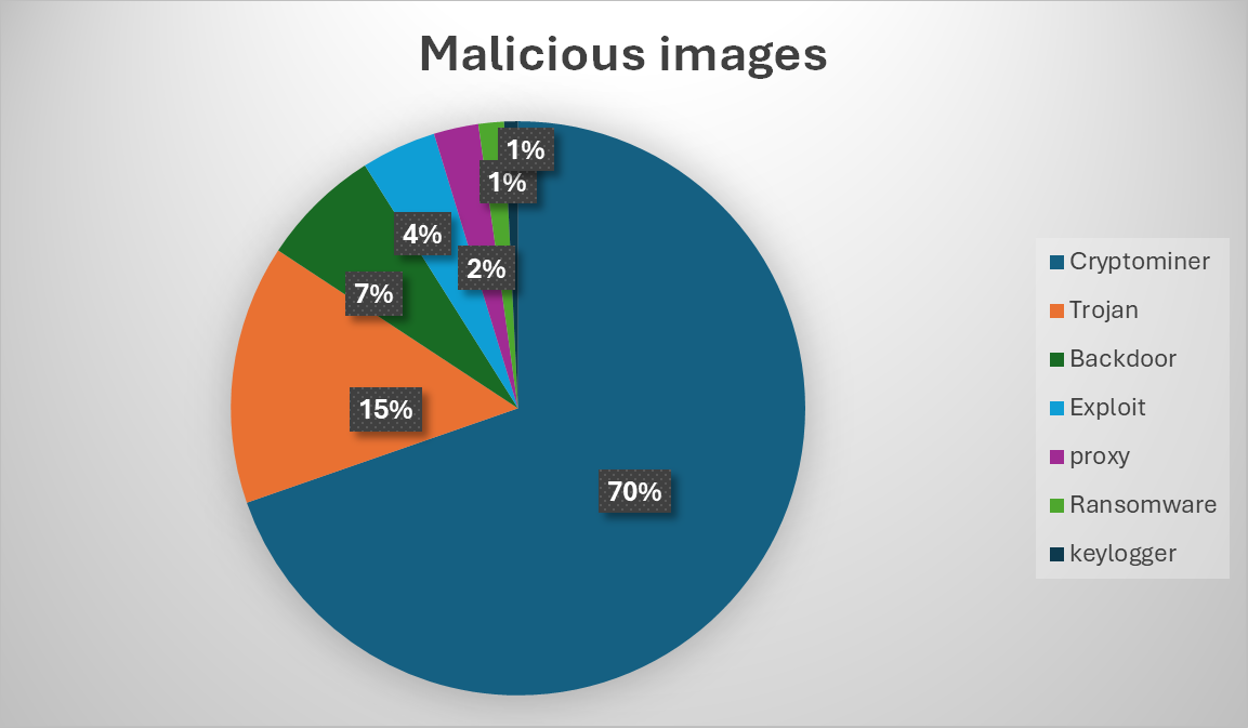
Fig. 1: Qualys Research – make up of malicious images based on analysis of more than 2,500 confirmed malicious containers detected on DockerHub
Public containers and preventing risk
Pulling a container image from a public registry should be a simple step that makes you more productive. But today, it is not without risk – instead, you have to trust that the person managing that container is who they say they are, and that there are no hidden agendas at play. Any mistake directly affects your application around security issues, cloud costs and stability of your application.
Threat actors will continue to abuse containers and the ecosystem around them. They will want to exploit that open approach to accessing containers, and the automation systems that rely on that openness to function. To avoid the threat here, implement image validation, scanning and runtime security steps into your automated processes. These steps can be added and run whenever you have to access and run container images, whether they come from public registries or your own image library. Putting this secure by design approach in place ensures you can stay fast but also reduce potential exposure to issues. This should not be a zero sum game of security, scale or speed – instead, you should build your container lifecycle so you can have control over all these elements automatically.
Author
🔍 FAQ
1. How do malicious container images enter the CI/CD pipeline?
Threat actors upload harmful payloads into public container registries (such as Docker Hub, Amazon ECR, or Google Artifact Registry) using deceptive names that mimic legitimate software. Developers seeking convenience may unknowingly pull these malicious images into their application pipelines without applying proper security checks.
2. What are the warning signs of a malicious container image?
Key warning signs include suspicious repository names (like misspellings of popular software or random, unpronounceable strings), extremely low pull counts compared to industry standards, and hidden execution artifacts such as obfuscated scripts or embedded cryptomining binaries within the image layers.
3. What are the most common risks hidden inside malicious containers?
Based on analysis of over 2,500 malicious images, 70 percent contained cryptomining software, most commonly Monero. Other common hidden threats include remote access backdoors, ransomware, keyloggers, and proxy infrastructure.
4. How can you prevent malicious containers from infecting your deployment?
To prevent attacks, organizations should automate vulnerability and zero-day malware scanning for both internal and public registries, enforce policies that only allow verified and scanned images to run, apply least privilege principles, and implement runtime security to monitor for suspicious activity like unexpected CPU usage or outbound network connections.